
Spending long hours on a computer can quickly lead to wrist fatigue, hand strain, and even long-term discomfort if your mouse is not designed with ergonomics in mind. That’s why ergonomic mice have become an essential upgrade for office users, gamers, and professionals who rely heavily on precision and extended usage.
Unlike traditional designs, ergonomic mice are shaped to support the natural position of your hand and wrist. Many users searching for the best ergonomic mice are looking for a balance between comfort, usability, and reduced strain during long working or gaming sessions.
What Makes a Mouse Ergonomic?
An ergonomic mouse is specifically designed to minimize awkward wrist angles and promote a more natural grip. Instead of forcing your hand into a flat position, it supports a relaxed posture that reduces pressure on muscles and tendons.
Common ergonomic design elements include:
- Vertical or semi-vertical hand positioning
- Contoured body shape for natural grip
- Thumb rests for added support
- Wider base for wrist stability
These design choices help reduce repetitive strain over time.
Benefits of Ergonomic Mice
Reduced Wrist Strain
One of the primary benefits is reduced tension in the wrist and forearm. By keeping your hand in a more natural position, pressure on sensitive nerves is minimized.
Improved Long-Term Comfort
Users who work or game for several hours daily often notice significantly less fatigue compared to standard mice.
Better Posture Support
Ergonomic mice encourage healthier arm alignment, which can also reduce shoulder and neck strain.
Enhanced Productivity
Comfort leads to consistency. When your hand is not fatigued, you can work longer with fewer breaks and improved focus.
Types of Ergonomic Mice
Vertical Mice
Vertical mice position your hand in a handshake-like posture. This reduces wrist twisting and is one of the most popular ergonomic designs.
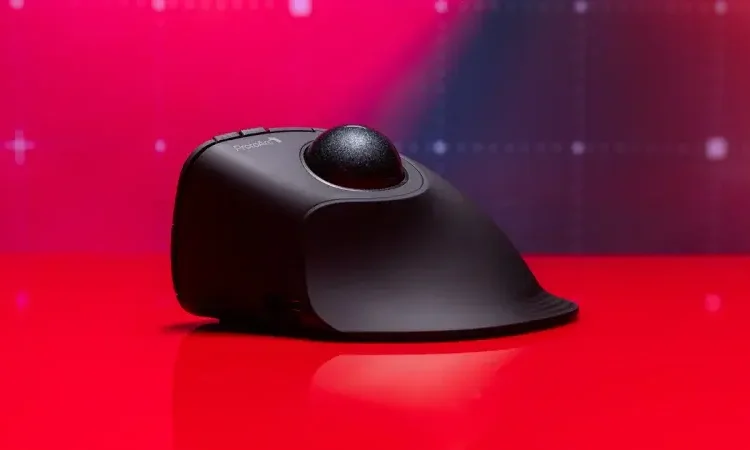
Trackball Mice
Instead of moving the entire mouse, you control the cursor using a stationary ball. This reduces arm movement and can be helpful for users with limited desk space.
Contoured Ergonomic Mice
These maintain a more traditional shape but include sculpted curves to support the palm and thumb naturally.
Split or Adaptive Designs
Some advanced models offer adjustable or split structures to accommodate different hand sizes and grip styles.
Key Features to Look For
Hand Fit and Size Compatibility
A proper ergonomic mouse should match your hand size. Too large or too small can reduce comfort benefits.
Grip Style Support
Different users prefer palm, claw, or fingertip grip styles. Ergonomic mice often favor palm grip for maximum support.
Wireless vs Wired
Wireless ergonomic mice reduce cable tension and allow freer movement, while wired versions may offer slightly lower latency.
Adjustable DPI
Sensitivity control helps reduce excessive hand movement, especially for users switching between tasks.
Pros and Cons of Ergonomic Mice
Advantages
- Reduced wrist and hand strain
- Improved long-term comfort
- Better posture alignment
- Suitable for extended daily use
- Can help reduce risk of repetitive strain injuries
Limitations
- Adjustment period required for vertical or trackball designs
- May feel unusual for users transitioning from standard mice
- Typically slightly more expensive than basic models
Who Should Use an Ergonomic Mouse?
Ergonomic mice are especially beneficial for:
- Office workers spending 6–10 hours daily on a computer
- Designers, editors, and developers
- Gamers experiencing wrist fatigue
- Users recovering from repetitive strain discomfort
- Anyone seeking long-term comfort improvements
Tips for Choosing the Right Ergonomic Mouse
- Match the design to your comfort needs
Vertical designs are best for wrist pain, while contoured models suit general use. - Test grip compatibility if possible
Comfort varies significantly between users. - Consider usage duration
The longer you use your mouse daily, the more important ergonomics become. - Check button placement
Buttons should be easy to reach without stretching your fingers.
Final Thoughts
Ergonomic mice are not just a comfort upgrade—they are a long-term investment in healthier computing habits. By supporting natural hand positioning and reducing strain, they make extended computer use significantly more comfortable. Whether for work, gaming, or everyday browsing, choosing the right ergonomic mouse can greatly improve both comfort and productivity over time.


